
Supported WinOLS Versions for Reseller Database Integration
This article explains: Which WinOLS versions are supported Which license types are required How to check your current WinOLS version Common compatibility issues and solutions.
In this article
Quick compatibility check
Before going into details, use this quick check:
✅ WinOLS 5 Full license → Supported
❌ WinOLS 5 Demo version → Not supported
❌ WinOLS 4.x or older → Not supported
If your setup matches the first option, reseller database integration is supported.

Supported WinOLS versions (software compatibility)
-
WinOLS 5 (official, licensed, up-to-date stable builds)
-
Installations obtained via an authorized WinOLS reseller like us.
-
WinOLS 4.x and older versions are not supported.
-
Unofficial or modified WinOLS installations are not supported.
Compatibility depends on using a legitimate and up-to-date WinOLS 5 installation.
Required license and account access
To access the Dyno-ChiptuningFiles Reseller Database, you need:
- A WinOLS 5 Full license
- An active Dyno-ChiptuningFiles account
WinOLS Demo licenses do not support database integration due to functional limitations.
How to check your WinOLS version (what you will see)
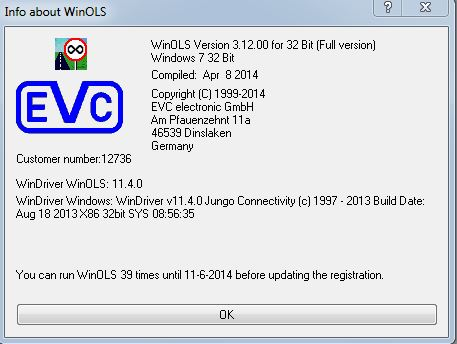
You can verify your WinOLS version by:
-
Opening WinOLS
-
Navigating to Help → Info about WinOLS or similar to find your version number.
-
Checking the installed version number
Depending on your WinOLS installation, you may see one of the following: Depending on your WinOLS installation, you may see one of the following:
If your version is outdated, updating is recommended before troubleshooting further.
WinOLS 5 – Full Version (supported)

Typical information shown:
-
WinOLS version number (for example WinOLS 5.99.x)
-
License type: Full
-
Registered user or company name
-
Installed modules or plugins
➡️ This version fully supports integration with the Dyno-ChiptuningFiles reseller database.
WinOLS 4.x or older (not supported)
Typical information shown:
-
WinOLS version 4.x or earlier
-
Older interface layout
-
No database or integration-related options
➡️ Older versions are not compatible with the reseller database.
WinOLS 5 – Demo version (not supported)
Typical information shown:
-
WinOLS version number
-
License type: Demo
-
Demo or functionality limitation notices
-
No active plugins or modules
➡️ Demo versions do not support reseller database integration.
Why older WinOLS versions are not supported
Older WinOLS versions lack:
-
Required API and database connectivity features
-
Compatibility with current reseller database updates
-
Security and performance improvements
Using unsupported versions often results in:
-
Connection errors
-
Missing database data
-
Inconsistent behavior inside WinOLS
Common compatibility issues and causes
First verify: WinOLS 5 Full license and an active reseller account.
If the reseller database does not appear in WinOLS, common causes include:
-
Using an unsupported WinOLS version
-
Running a demo or limited license
-
Incorrect WinOLS installation or permissions
-
Reseller account not yet activated
Most issues can be resolved by updating WinOLS and confirming account access.
What to do if your setup is not supported
If your current setup is not supported:
-
Upgrade to a WinOLS 5 Full license
-
Ensure your Dyno-ChiptuningFiles reseller account is active
If license or version details are missing
If the About window shows limited or unclear information, this is often caused by:
-
Incomplete installation
-
License activation issues
-
An outdated or corrupted WinOLS setup
Updating or reinstalling WinOLS usually resolves these problems.