
How to tune an ECU: tools, laptops and DIY options
This blog explains how ECU tuning works with laptops and tools, what DIY tuners should know, and how Dyno-ChiptuningFiles ensures safe, proven results.
In this article
Modern powertrains are managed by sophisticated control units that coordinate air charge fuel mass ignition or injection timing and protection strategies thousands of times per second. Tuning is the disciplined recalibration of the maps and limiters that govern this behavior. The common question is whether you can do it yourself with a laptop and a cable. The truthful answer is yes in selected cases, but the quality of the result depends on your tooling, your understanding of the torque model, and your access to reliable calibrations. The following overview separates possibility from professional practice and shows where Dyno-ChiptuningFiles adds real value.
Can you tune an ECU yourself

You can, provided that you understand the platform and you accept the responsibility for outcomes. DIY tuning moves you from installer to calibration engineer. That shift requires a structured workflow and the right safeguards.
Practical prerequisites
-
Proven read and write access for the target ECU in OBD II bench or boot mode
-
A stable power supply with sufficient current for write sessions and battery support during ignition cycles
-
Logging capability for boost lambda or smoke index rail pressure ignition or injection timing temperatures and knock where applicable
-
A controlled test environment such as an eddy current dyno or at minimum repeatable road logging with safe load conditions
-
A recovery path for failed writes including bench access and where needed boot mode or external programming tools
If any of these elements are missing your risk of bricking the control unit or producing a poor calibration increases sharply. Professional workshops often choose a hybrid approach. They perform the hardware interface and validation locally but rely on dyno tested files from Dyno-ChiptuningFiles to secure results with fewer iterations.
Can you tune an ECU with a laptop
Yes. A Windows laptop remains the most common host for flashing and logging suites. The computer itself is not the key factor. Stability and I O integrity are. Use a clean operating system image with reliable USB controllers and disable power saving that might interrupt a write. Always connect a dedicated battery support unit before flashing. Many failures attributed to tools are actually voltage or communications problems.
Can you tune any ECU?
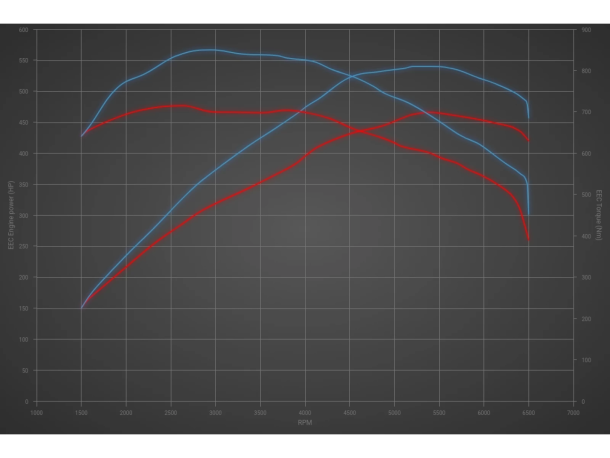
No. Capability is platform specific. Some ECUs offer OBD II read and write with robust recovery. Others require bench access. Certain generations demand boot mode connection on the PCB. Newer secure platforms may need online unlocks, seed keys, or patched bootloaders that are not publicly available. Before you accept a job confirm the exact ECU family software version and security level. Cross-check whether your tool supports both read and write and what recovery options exist. Dyno-ChiptuningFiles can advise on support status and safe procedures for common European and Asian platforms, including nuances such as torque monitor thresholds and catalyst protection logic that must remain intact.
Is ECU tuning really free?
In reality, tuning is never free, even if the software appears to be. Free or low-cost tools may save on licenses, but they cost time, reliability, and often recovery effort when something goes wrong. Every tuning session requires either paid software or valuable workshop time. Professional workshops therefore invest in licensed tools and a proven file partner like Dyno-ChiptuningFiles to ensure safe, repeatable results and efficient workflows that truly save money in the long run.
What is the best ECU tuning tool
There is no universal best tool. The right choice depends on your target fleet, the access method you prefer, and the level of support you require. Evaluate tools against the criteria below rather than marketing claims.
Selection criteria for workshops
-
Coverage. Confirm support for your core brands ECU families and software revisions including service packs and market variants
-
Access methods. OBD II only or also bench and boot mode. Recovery and clone functions for disaster cases
-
Datalogging. Native high rate logging with correct units and scaling or at least reliable integration with third party loggers
-
Stability and recovery. Proven write verification, automatic checksum handling, and documented recovery paths for power loss or partial writes
-
Documentation and updates. Clear procedures wiring guides bench pinouts and frequent protocol updates
-
Support response. Real technical help when a session fails, not generic replies
-
Legal and compliance. Respect for protections and a workflow that does not force removal of safety strategies
A realistic strategy is to carry two complementary tools so that if one cannot read or recover a unit the other can. Combine this with a file partner that understands the torque model for the platform and you have a robust service offer.
A safe and efficient DIY workflow
Whether you write your own files or use professional files from Dyno-ChiptuningFiles, a disciplined process reduces risk and improves outcomes.
Recommended steps
-
Intake and inspection. Scan for diagnostic trouble codes verify fuel quality check for boost leaks and confirm proper service items
-
Baseline measurement. Record stock logs and if available a dyno pull to document torque air mass lambda and temperatures
-
Read and back up. Save the original file and any coding data in multiple locations
-
Flash with support. Use a battery stabilizer follow documented procedures and verify checksums and post write status
-
Validate. Log repeatable road segments or perform dyno holds to confirm correct torque delivery and temperature behavior
-
Iterate only with data. Adjust maps or request a revision from Dyno-ChiptuningFiles based on logged evidence not on guesswork
-
Document. Provide the client with a clear record of changes baseline data and final results
Where Dyno-ChiptuningFiles.com fits in
Dyno-ChiptuningFiles provides dyno tested and platform coherent calibrations produced by certified programmers who respect factory protections. We align requested torque air charge fuel mass and thermal management to deliver measurable gains without compromising safety nets. For workshops this means faster turnaround times, fewer comebacks and a repeatable customer experience. For advanced enthusiasts it means professional grade results with transparent data and support.
Key benefits for your operation
-
Access to proven economy performance or tow focused calibrations built within safe limits
-
Support for specific hardware such as intercoolers downpipes intakes or larger injectors with correct torque and smoke control
-
Clear logging targets and acceptance criteria so you know exactly what to verify before delivery
-
Custom options when duty cycles or local conditions require tailored solutions
You can tune an ECU yourself and you can do it with a laptop, but success depends on more than a cable and curiosity. Not every ECU is equally accessible and free tools often lack the coverage, recovery and support you need for professional work. The best tool is the one that safely supports your target platforms, logs the right data, and comes with real documentation and help. Combine reliable hardware with disciplined process and dyno validated files from Dyno-ChiptuningFiles and you deliver results you can stand behind.