
WinOLS Versions Explained: WinOLS 4 vs WinOLS 5
WinOLS 4 vs WinOLS 5 compared: SQL project database, 64-bit float maps, modern hardware support, dark-mode interface, and whether to upgrade your license.
In this article
If you already run WinOLS or are about to buy it, one question comes up fast: what is the difference between WinOLS 4 and WinOLS 5, and does it matter for the way you work? The honest answer is that WinOLS 5 is the current generation and WinOLS 4 is the previous one. WinOLS 5 is not a different product with a different philosophy, it is the same professional tuning platform brought up to date for modern ECUs, modern hardware and larger workloads.
This guide lays out what actually changed, what stayed the same, and whether the upgrade is worth it for your setup. If you are still choosing which license to buy, pair this with how to choose the right WinOLS license; this article is about the version difference, that one is about the buying decision.
The short answer
WinOLS 5 is the version you should be using. WinOLS 4 is being phased out, and its practical limitations are increasing as the WinOLS ecosystem moves towards WinOLS 5.
Major resellers increasingly provide file content in a more flexible way. Instead of purchasing a complete project containing everything, tuners can access or purchase specific elements separately, such as an original file, Vmax solution or pops and bangs solution. WinOLS 4 users can already no longer take advantage of many of these database features.
The same applies to our reseller database: WinOLS 4 users can no longer access and use the database functionality available to WinOLS 5 users.
For existing WinOLS 4 users, the question is therefore no longer whether upgrading is worthwhile, but how to move to WinOLS 5. Depending on when your WinOLS 4 licence was purchased, the upgrade may even be free.
What is new in WinOLS 5

These are the changes that matter in daily use, not a marketing list:
- SQL database for project management. WinOLS 5 manages your projects through an SQL database. In practice that means faster, more reliable searching, filtering and sorting across your library, and it holds up when you have hundreds or thousands of projects rather than a handful. For a busy shop, this is the quiet upgrade that pays off every single day.
- 64-bit floating point map support. This is the decisive one. The most modern control units use maps that WinOLS 5 can represent in full detail thanks to 64-bit floating point support. If you work on newer vehicles, this is not a nice-to-have, it is the difference between mapping a unit properly and not being able to touch it correctly at all.
- Support for current hardware. WinOLS 5 supports modern hardware such as BDM100, BSL100 and OLS300. At the same time, some older hardware is being left behind: the OLS200 simulator and MP2440P only run on older Windows, and Megaprommer MP2240P and OLS16 are no longer supported. If your bench still leans on legacy hardware, check your setup before you assume it carries over.
- A modernized interface, including dark mode. The interface has been updated, dark mode included, and it now offers configurable search masks for naming maps. Those search masks let you build your own map database over time, which turns repeat work into a growing personal asset instead of a task you redo from scratch.
Current checksum support. Checksum support for WinOLS 4 has not been updated since 31 December 2022. Current checksum data and updates are focused on WinOLS 5. If you still rely on WinOLS for checksum correction, upgrading to WinOLS 5 is therefore increasingly important to ensure you are working with current checksum support.
For more information about how checksums work in practice, see Maps, axes and checksums in WinOLS.
What stayed the same
Upgrading does not mean relearning the tool. The core of WinOLS is unchanged:
- The project and version model. For every project the original is stored permanently, and your changes are saved as versions you can name, comment and roll back, with edits shown in color. This is still how you work.
- The map-finding toolkit. 2D and 3D map views, hex and decimal dump, automatic processor detection, and automatic searching for ECU and software numbers all remain.
- Import and export. Binary files, Intel and Motorola hex formats, with the same options to zip, code, swap lines or send directly.
- Per-workstation licensing. A license is still valid for one workstation and is not transferable, in both versions.
So the muscle memory transfers. What you gain is scale, modern ECU coverage and current hardware support, not a new way of working.
Does the difference matter for your work?
If you want to keep using WinOLS as a fully current professional platform, the answer is straightforward: WinOLS 5 is the version to move to.
WinOLS 4 still works and may remain perfectly usable for existing projects and older ECU platforms. But it is now effectively the legacy generation. EVC's ongoing development is focused on WinOLS 5: new WinOLS features are released for version 5, and checksum modules for WinOLS 4 have not been updated since the end of 2022.
For day-to-day work, the difference becomes more noticeable depending on what you do:
- You work on newer vehicles: WinOLS 5 gives you the current platform, including newer data-type support such as Float64 and the latest development of EVC's checksum modules and software features.
- You run at volume with a large project library: WinOLS 5 adds the SQL-backed project management and Map Database features that make large numbers of projects and repeated map-identification work easier to manage.
- You mainly work on older platforms: WinOLS 4 may still do everything you need today. The limitation is not that it suddenly stops working, but that it no longer follows the same development path as WinOLS 5.
So the real distinction is less about whether WinOLS 4 still works and more about whether you want to stay on EVC's actively developed platform. For a professional tuner who wants the full current WinOLS ecosystem, that increasingly means WinOLS 5.
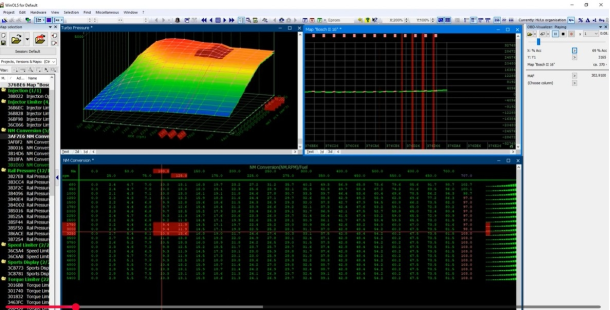
Upgrading from WinOLS 4 to WinOLS 5
The good news is that the cost depends on when you bought, and for many it is nothing:
- Bought WinOLS 4 after 01-04-2020: your upgrade to WinOLS 5 is free, per seat. There is no reason to wait.
- Bought before that date: the upgrade is paid, and the exact route depends on your license. Run it through the WinOLS 5 upgrade form so you are quoted the correct path for your account instead of guessing.
Before you commit, two quick checks: confirm your target setup is supported for database integration in which WinOLS versions are supported, and make sure you are buying through an official channel, as covered in why buying WinOLS from an official reseller matters. All current license and upgrade options sit on the WinOLS 5 software page.
Which version should you run?
- New buyer: start on WinOLS 5. There is no case for buying into the previous generation today.
- On WinOLS 4, bought after 01-04-2020: upgrade now, it is free per seat.
- On WinOLS 4, bought earlier: upgrade through the form; the modern ECU and hardware support alone justifies it for active work.
- Everyone: keep your WinOLS 5 current with the annual update pack, because the version advantage only holds if the updates keep flowing.
Move to the current generation of WinOLS. See every license and upgrade option on the official WinOLS 5 software page, start the switch through the upgrade form, and pair it with reseller database access so every project starts from a verified base.